Development guide
IMAS access layer repositories
The IMAS access layer consists of a number of components which are developed in separate repositories:
IMAS-Core: the IMAS core repository, MDSplus model generator and Python lowlevel bindings.
Dependencies:
data-dictionary: the IMAS Data Dictionary definitions, used for generating MDSplus models and end-user APIs in Fortran, C++, Java and Matlab.
The documentation on this page covers IMAS-Core build and installation.
Development environment
See the IMAS-Core section in the Installation guide for an overview of modules you need to load when on SDCC or packages to install when using Ubuntu 22.04.
Architecture
Figure 1 depicts the layered AL architecture model. It comprises the upper end-user APIs in Fortran, C++, Java and Matlab and the so-called Low Level (LL), which receiveens-user APIs requests. The LL includes a C layer with C functions (wrappers) for calling the functions of the (C++) LL API located in the C++ layer of the LL.
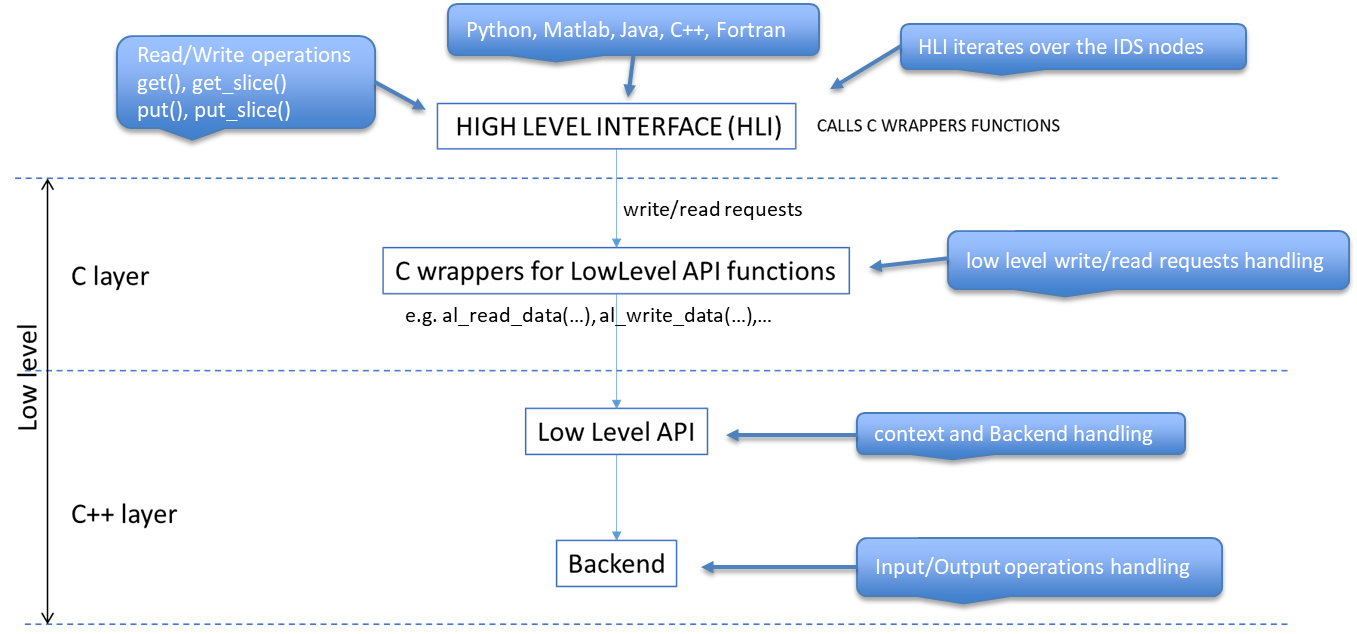
Figure 1: Layered AL architecture model
When calling an AL API function (get()/get_slice(), put()/put_slice()),
theens-user API iterates over all nodes of the IDS where each visited node is
either a scalar, or an array (with dimensions from 1 to 6) or an array
of structures.
Distinguishing Read and Write operations, we have two use-cases:
When calling
get()/get_slice(), theens-user API calls the LL for each visited node, passing the data contained in the node (scalar or array), the parameters which define the dimension(s), the shape(s) of the data and the identifier (path) of the node. Then the LL calls the backend, which returns the data to the LL, which in turn returns the data (allocated pointers) to theens-user API.When calling
put()/put_slice(), theens-user API calls the LL for each node, passing a pointer to the data to be written, the parameters which define the dimension(s), the shape(s) of the data and the identifier (path) of the node. Then the LL calls the backend, which writes the data to some storage.
Tests
You will find tests in the tests directory. The tests are written to test diiferent backends like MDSPLUS, HDF5, ASCII, Memory and UDA. It writes and reads data from the backends and checks if the data is written and read correctly.
CMake
We’re using CMake for the build configuration. See the CMake documentation for more details about CMake.
The FetchContent CMake module for making dependencies from other repositories
available. For more information on this module we refer to the
FetchContent CMake documentation
Documentation overview
The documentation is generated with Sphinx which you can find in docs directory. Code documentation is generated using doxygen and configured in Makefile of Sphinx. For more information on Sphinx, see the Sphinx docs and the documentation of the theme (sphinx-immaterial) that we’re using.
docs folder contains the configuration (conf.py), and documentation pages (*.rst).
Building the documentation
For building documentation, you need to have the following dependencies installed: - Python - Doxygen
$cd IMAS-Core
# Create and activate a venv
rm -rf docs_venv
python -m venv docs_venv
. docs_venv/bin/activate

# Install dependencies
pip install --upgrade pip
pip install -r docs/requirements.txt

export SPHINXOPTS='-n --keep-going'

make -C docs html
Publish IMAS-Core on pypi
We are using Github Actions to publish the IMAS-Core package on pypi. The configuration is in .github/workflows/pypi.yml.
Documentation Github Actions:
Documentation is built using Github Actions. The configuration is in .github/workflows/docs.yml.
We are using readthedocs for the documentation. The documentation is built on every push to the main branch.